Work profile (BYOD)
The work area of a personal Android device. The personal profile is managed separately.
The current template contains 10 parameters. This is the list of the form, not a guarantee of enforcement on every device. For each item below, the meaning of the selected value and the way to verify it are given.
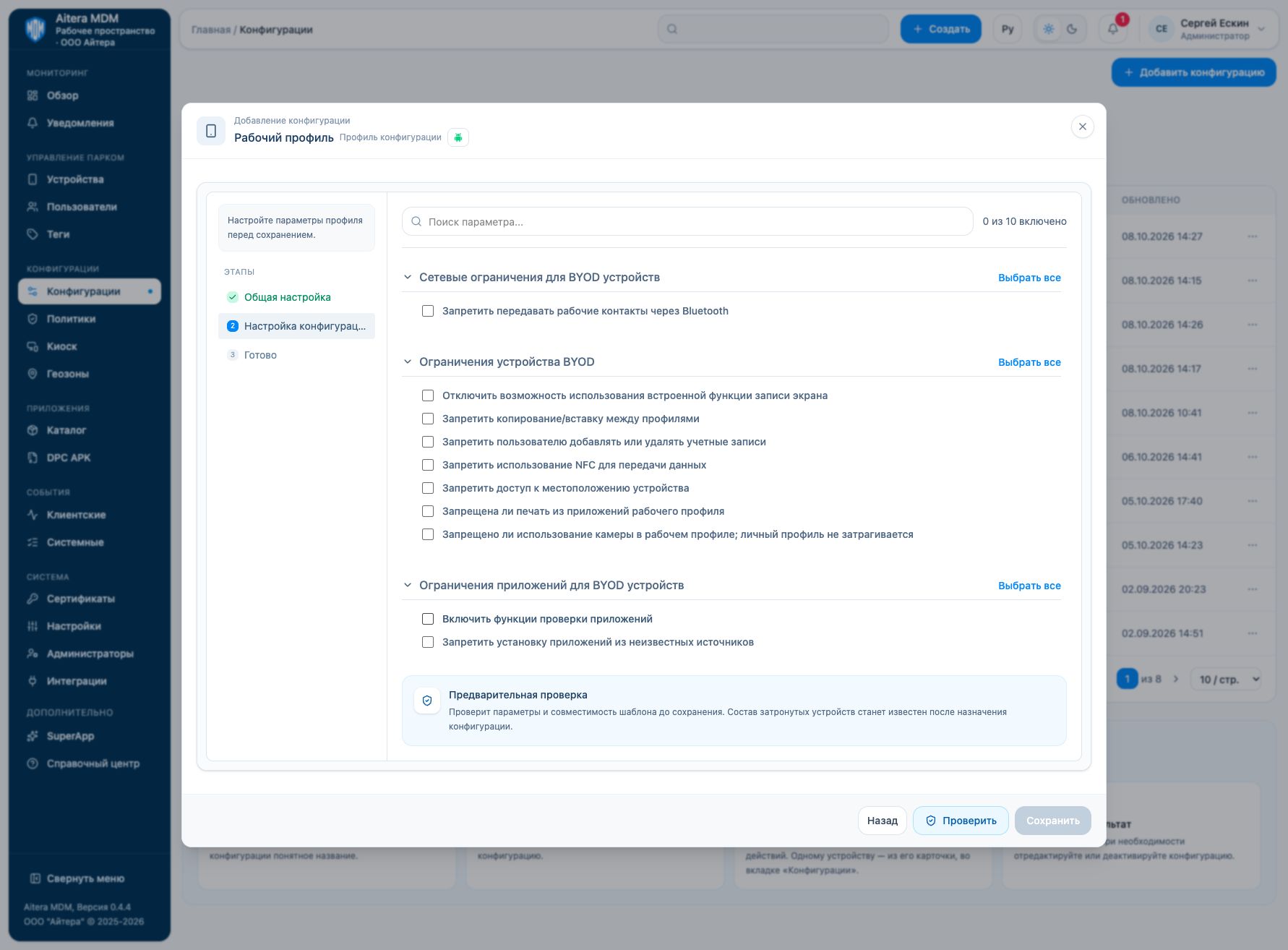
Meaning of the toggles
For “Disallow/Disable” parameters, turning the toggle on sets the restriction. For “Enable verification”, turning it on sets an additional check. A cleared checkbox does not prove permission: other profiles or system rules may apply.
Conditions of application
Check the management channel (proprietary DPC or Android Enterprise), mode, OS version, and management rights. Minimum OS versions are not shown in the received form; the former help tables are not considered confirmation of compatibility with the current template. First use the preliminary check, then a test device.
Network restrictions for BYOD devices
This section groups the settings of the device and its system functions. Each item defines a separate behavior; “Select all” changes all items of this block only.
Disallow sharing work contacts over Bluetooth
Prohibits transferring work contacts over Bluetooth. Personal contacts should not be considered an object of this setting.
Verification: Check access to work contacts from a connected Bluetooth device.
BYOD device restrictions
This section groups the settings of the device and its system functions. Each item defines a separate behavior; “Select all” changes all items of this block only.
Disable the built-in screen recording feature
Restricts built-in recording of screen content. The scope of protection depends on the management mode and profile.
Verification: Try the built-in recording of the work screen; do not consider this protection against external photo or video capture.
Disallow copy/paste between profiles
Restricts transferring content through the clipboard between the work and personal profiles. These are not all ways of exchanging files.
Verification: Check copying work text into a personal application and the reverse direction.
Disallow the user from adding or removing accounts
Restricts the user from adding, changing, or removing accounts within the profile management scope.
Verification: Check the accounts menu and the operation of the already configured work account.
Disallow using NFC to transfer data
Prohibits data transfer over NFC according to the meaning of the template; do not automatically extend this to all NFC scenarios.
Verification: Check the specific work method of NFC exchange used on the target model.
Disallow access to device location
Restricts access to geolocation. It may interfere with a separate coordinate collection configuration.
Verification: Check permissions and coordinate retrieval in the work scenario; the absence of coordinates does not prove that the device is outside the geozone.
Disallow printing from work profile apps
Prohibits printing; for BYOD, it explicitly restricts printing from the work profile.
Verification: Open the print action in a work application; check the personal profile separately.
Disable camera access in the work profile; the personal profile is not affected
Restricts the use of the camera. For BYOD, the current template explicitly specifies the work profile and keeping the camera in the personal profile.
Verification: Check the camera in a work application and, for BYOD, separately in a personal application.
Application restrictions for BYOD devices
This section groups the settings of the device and its system functions. Each item defines a separate behavior; “Select all” changes all items of this block only.
Enable app verification features
Enables application verification available in the selected Android mode.
Verification: Check the system verification state and the installation event of a test application.
Disallow installing apps from unknown sources
Prohibits installation from unknown sources within the scope of the profile. Delivery of a managed application is a separate channel.
Verification: Check manual installation of an allowed test APK and, separately, installation through MDM.
Assignment and result
Create a configuration, run the preliminary check, and assign it to recipients. In the device card, check the assignment, contact, and application events. If there is no result, check the mode, channel, delivery, and compatibility; an “Active” entry in the configuration list does not by itself prove enforcement.