LDAP
Import of users and groups from a corporate directory. The connection, branch selection, and schedule are configured on a separate LDAP page.
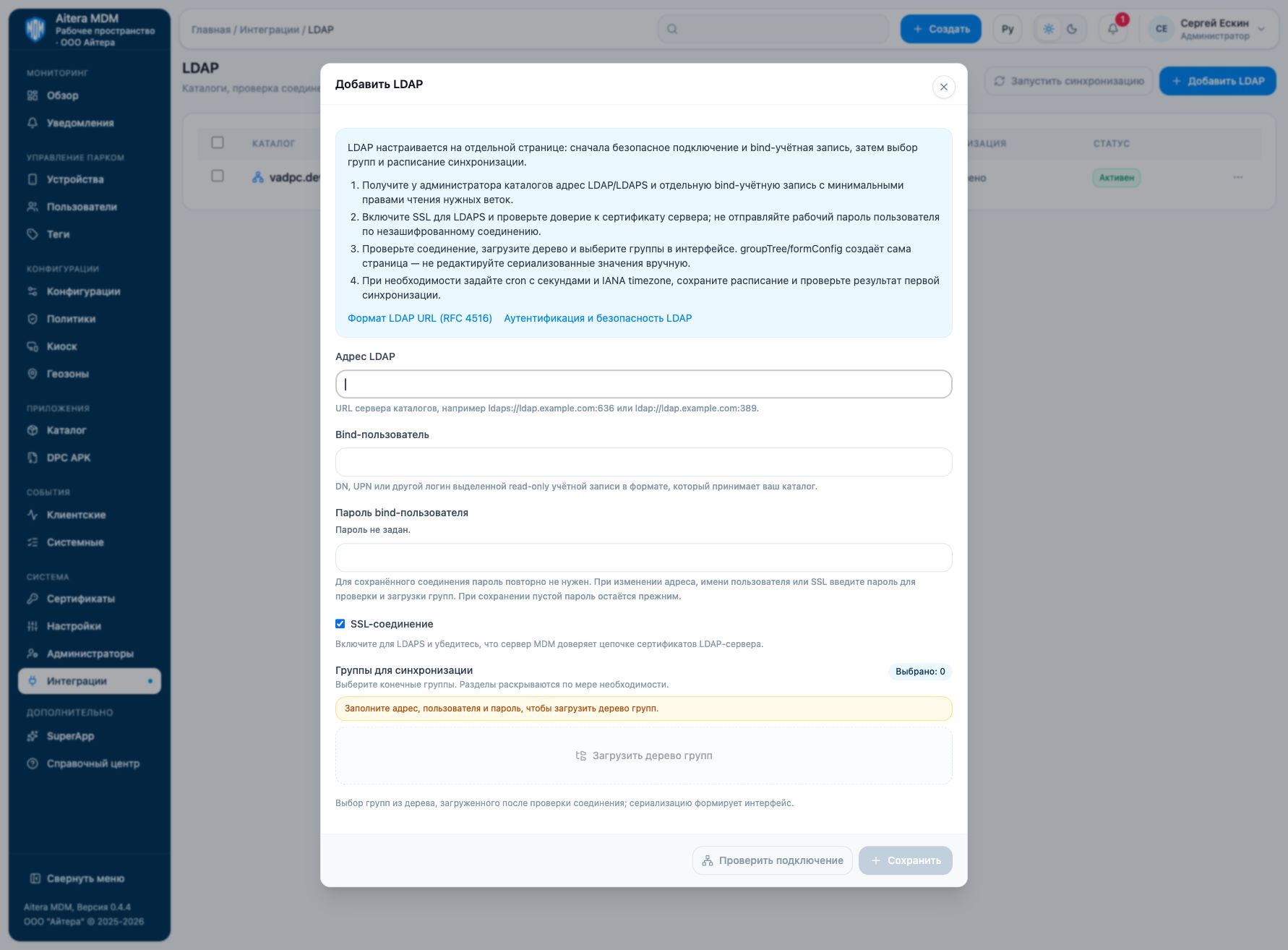
Open Integrations → LDAP → Manage LDAP. The connection parameters are also available on the integration card.
Preparation
- Get the LDAP/LDAPS address from the directory administrator, along with a dedicated bind account with minimal read permissions for the required branches.
- Enable SSL for LDAPS and verify trust in the server certificate; do not send a working user password over an unencrypted connection.
- Test the connection, load the tree, and select groups in the interface. groupTree/formConfig is generated by the page itself — do not edit the serialized values manually.
- If needed, set a cron expression with seconds and an IANA timezone, save the schedule, and check the result of the first synchronization.
Parameters
| Field | Type | Purpose and filling rules |
|---|---|---|
| LDAP address | Setting | Directory server URL, for example ldaps://ldap.example.com:636 or ldap://ldap.example.com:389. |
| Bind user | Setting | DN, UPN, or another login of a dedicated read-only account, in the format accepted by your directory. |
| Bind user password | Secret | Password of the dedicated directory read account; transmit it only over a secure connection. |
| SSL connection | Setting | Enable for LDAPS and make sure the MDM server trusts the certificate chain of the LDAP server. |
| Groups to synchronize | Generated by the interface | Selection of groups from the tree loaded after the connection check; the interface generates the serialization. |
| Cron schedule | Setting | Scheduler cron expression with seconds, in the MDM scheduler format; use the ready-made options on the page or a verified expression. |
| Time zone | Setting | IANA timezone of the schedule, for example Europe/Chisinau. |
| Form configuration | Generated by the interface | Internal serialized state of the LDAP form. It is created by the interface and is not intended for manual entry. |
Saving and changing
Fill in the parameters and click “Save”. When the form is reopened, secrets are not shown: the secret presence indicator is not its value. An empty field for an existing secret keeps the previous value; a new value replaces it. After making changes, check the connection again.
Verifying the result
- Check the bind connection and load the group tree.
- Select only the required groups and save the schedule with the time zone.
- After synchronization, check the composition of groups and users in MDM; a successful bind does not mean the import has completed.
The “Configured” status means the settings are saved. Evaluate the result of the connection check and the result of the target operation separately. Details of the check are available on the connection card.
Limitations and dependencies
LDAP users can be added to regular MDM groups and removed from them. The membership of a synchronized LDAP group is changed in the source directory and then synchronized. groupTree and formConfig are generated by the interface. An empty password in a saved connection keeps the previous one; when the address, user, or SSL is changed, the form requires the password to check the connection and load the tree.
Troubleshooting
| Symptom | What to check |
|---|---|
| Bind fails | Check the address, DN/UPN format, password, and read permissions. |
| LDAPS does not connect | Check the port, TLS, and the MDM server’s trust in the directory certificate chain. |
| The tree is empty / the required group is missing | Check the bind account permissions, availability of the branches, and the search scope. |
| The import starts at the wrong time | Check the cron expression with seconds and the IANA timezone, including daylight saving transitions. |